StayOps: Getting a Rental Dashboard Out of Figma and Into Daily Use
StayOps started as a practical tool for our household, and a chance to see how far I could take one of my own ideas beyond Figma.
I’d built working prototypes before, including DestinationX in Bubble and the live Unbound Library site, but I often reached the same stopping point: the design was ready, and the next meaningful step required engineering support.
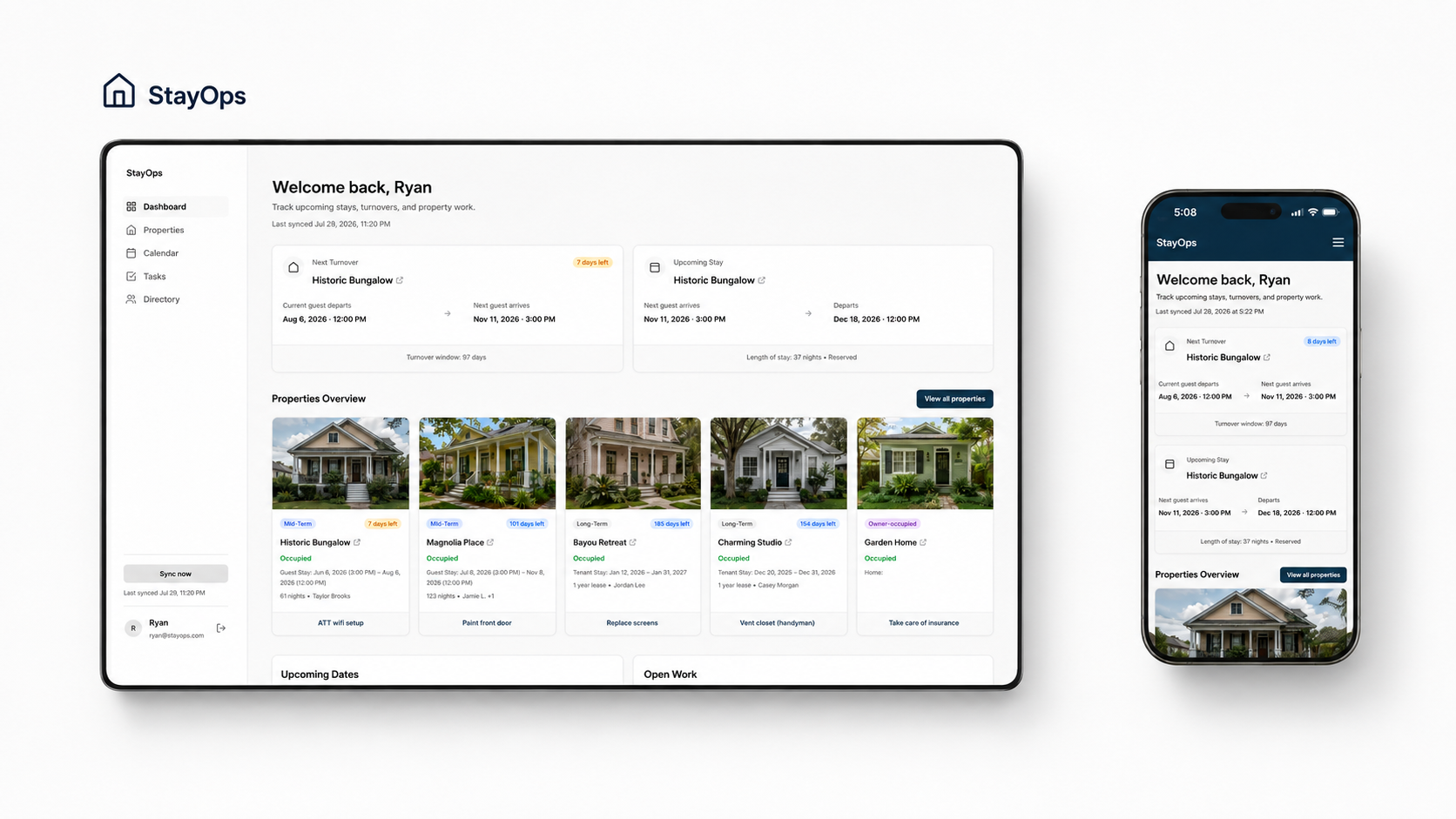
StayOps brings upcoming stays, turnovers, property status, open work, and key dates into one household operations dashboard.
At the same time, my wife and I had a real problem worth solving. We manage a small mix of long- and mid-term rental properties, and the information we regularly needed was spread across too many places.
Incoming and outgoing stays were in Airbnb. Property information and contacts were moving into Google Sheets. Tasks were organized by property in Trello. Lease details might be in TurboTenant, an email, or a PDF saved on one of our computers. Vendors were often in whichever phone belonged to the person who had contacted them last.
None of those tools was necessarily the problem. The problem was having to piece everything together whenever one of us needed to know what was happening.
I wanted one place where we could quickly answer:
Which property needs attention next?
What stay, lease date, or turnover is coming up?
What work is still open?
Who do we contact?
Where can we find the basic information for each property?
I also wanted to see whether I could turn that idea into something we would actually use—not just another portfolio prototype.
My role: Product direction, UX/UI design, implementation direction, testing, and release
Tools: Figma, ChatGPT, Cursor, Vite, GitHub, Supabase, Vercel, Google Sheets, Trello, and Airbnb iCal
Timeline: About two weeks from initial design to a connected working app, followed by additional testing, privacy work, and release work.
Getting out of Figma quickly
I kept the first version focused.
StayOps wasn’t meant to become a full property-management platform. We didn’t need to rebuild accounting, payments, guest messaging, Airbnb, or Trello. We needed a clearer view of the information we already checked most often.
I used ChatGPT early to organize requirements, explore possible page structures, and challenge what belonged in the first version. That gave me enough direction to get into Figma without trying to solve every possibility first.
I designed the Dashboard, Properties, Property Detail, Tasks, Calendar, Directory, and responsive navigation, along with a small component system for cards, tables, filters, status labels, and mobile layouts.
The first build used fictional properties and placeholder information. Within a few days, I had moved from rough product structure to designed screens and then into a working browser version.
Once I could click through the interface in code, connecting it to real information no longer felt like an entirely separate project.
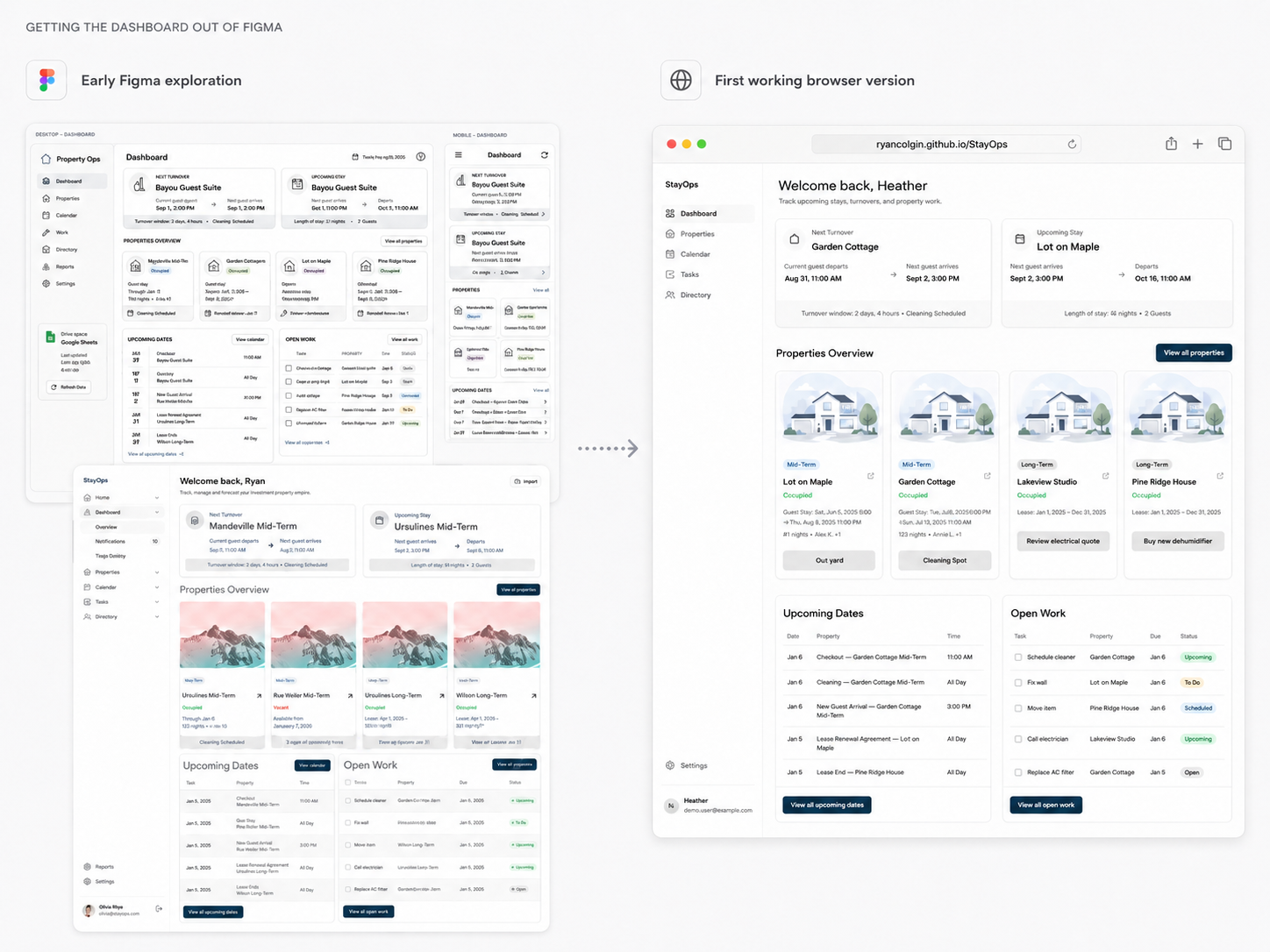
I used ChatGPT to sort through the early structure, then moved into Figma and a working browser build before polishing every detail.
Turning a public demo into a private app
A public prototype could explain the idea, but a version we could use needed our actual addresses, contacts, bookings, lease dates, tasks, and notes.
I kept the original project as a public demo with fictional data and created a separate private app for our household. Both versions share the same core interface, but they serve different purposes:
Public demo: safe to share in a portfolio or interview
Private app: connected to the information we actually manage
The private version added Supabase for authenticated data and passwordless email login. My wife and I can request a magic link and open StayOps from a phone or computer without managing another shared password.
I could keep the demo intact for sharing while continuing to build the version we would actually use.
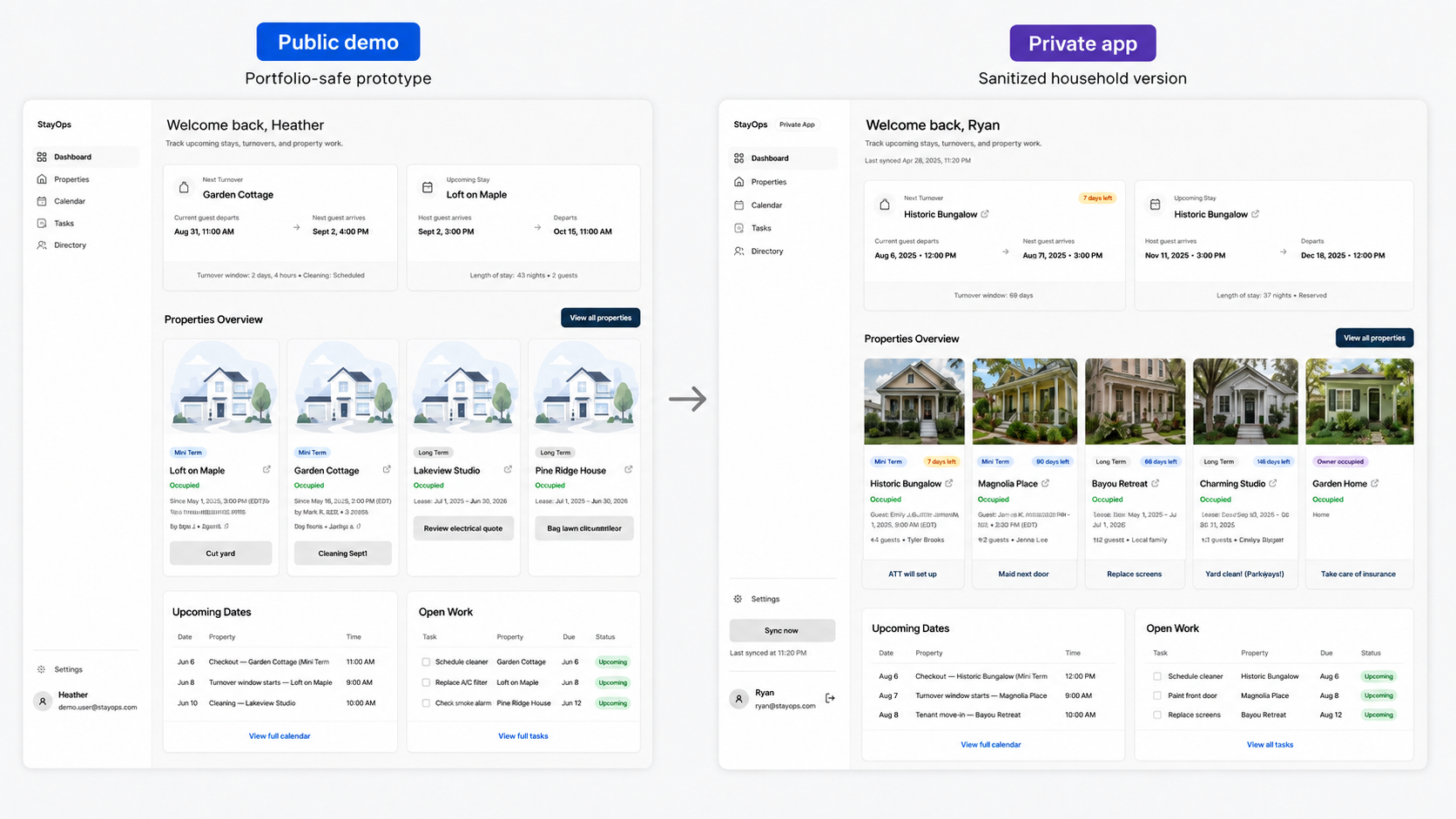
Public demo on the left; sanitized private app on the right.
Connecting the information we already used
I didn’t want StayOps to become another place where we had to maintain the same information manually.
Instead, each existing tool continued doing what it already did well.
Google Sheets
Google Sheets became the editable source for property details, lease information, contacts, images, links, and other reference data.
The first time a row from the spreadsheet appeared in the right cards, filters, detail pages, and directory entries, the app started to feel real.
Airbnb iCal
For the mid-term rentals, Airbnb calendar feeds provide reservation dates that StayOps turns into current and upcoming stays, arrival and departure events, stay lengths, and turnover windows.
Standard property information, including check-in and check-out times, still came from Google Sheets.
Trello
We already used a Trello board with work grouped by property, so replacing it would have created more work.
StayOps reads the relevant lists and surfaces open tasks on the Dashboard, Property Detail pages, and Tasks view. We can continue managing the work in Trello while seeing it alongside stays, dates, contacts, and property information.
Supabase and Vercel
Supabase handles the private app’s data and authentication. Vercel hosts the app and runs the server-side sync process.
The flow is:
Google Sheets + Airbnb calendars + Trello → hosted sync → Supabase → StayOps
StayOps doesn’t replace those tools. It brings the parts we need most into one view.
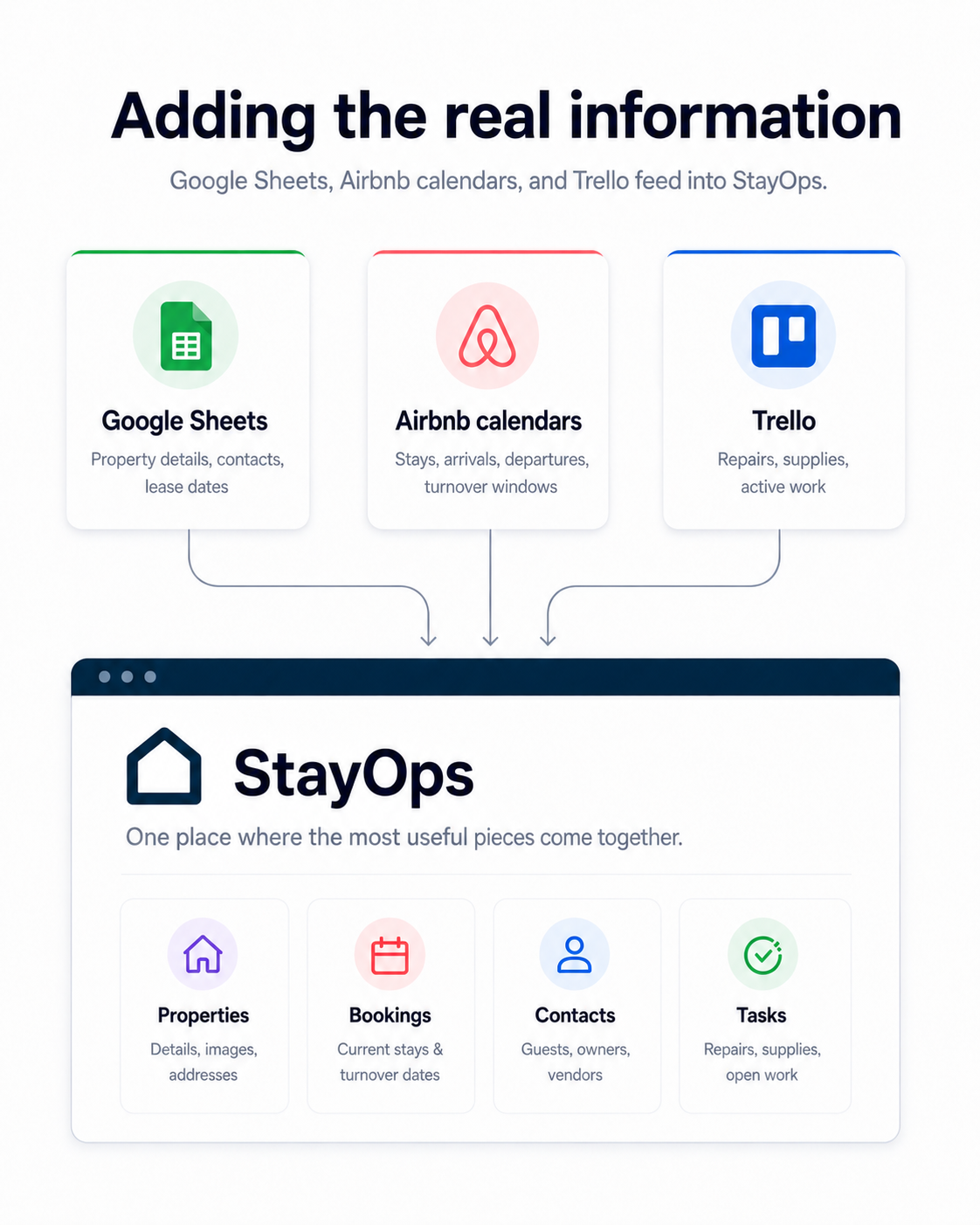
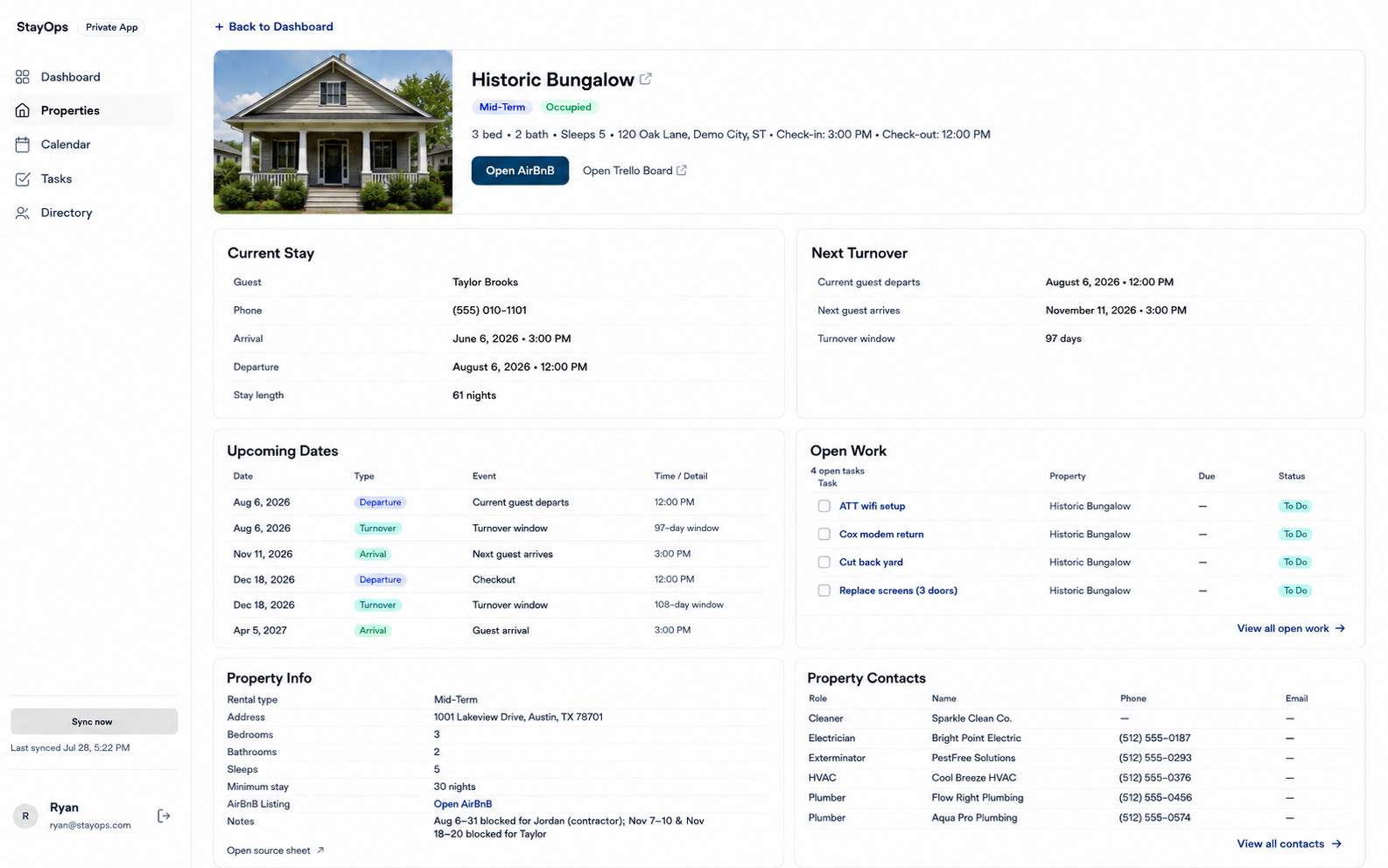
Property Detail combines information from several sources without hiding where that information is managed.
Building with ChatGPT and Cursor
I didn’t start this project knowing how to implement every part of it—or most of it.
I did bring years of product experience: defining behavior, reviewing implementation, working through tradeoffs, and noticing when something felt confusing, incomplete, or risky.
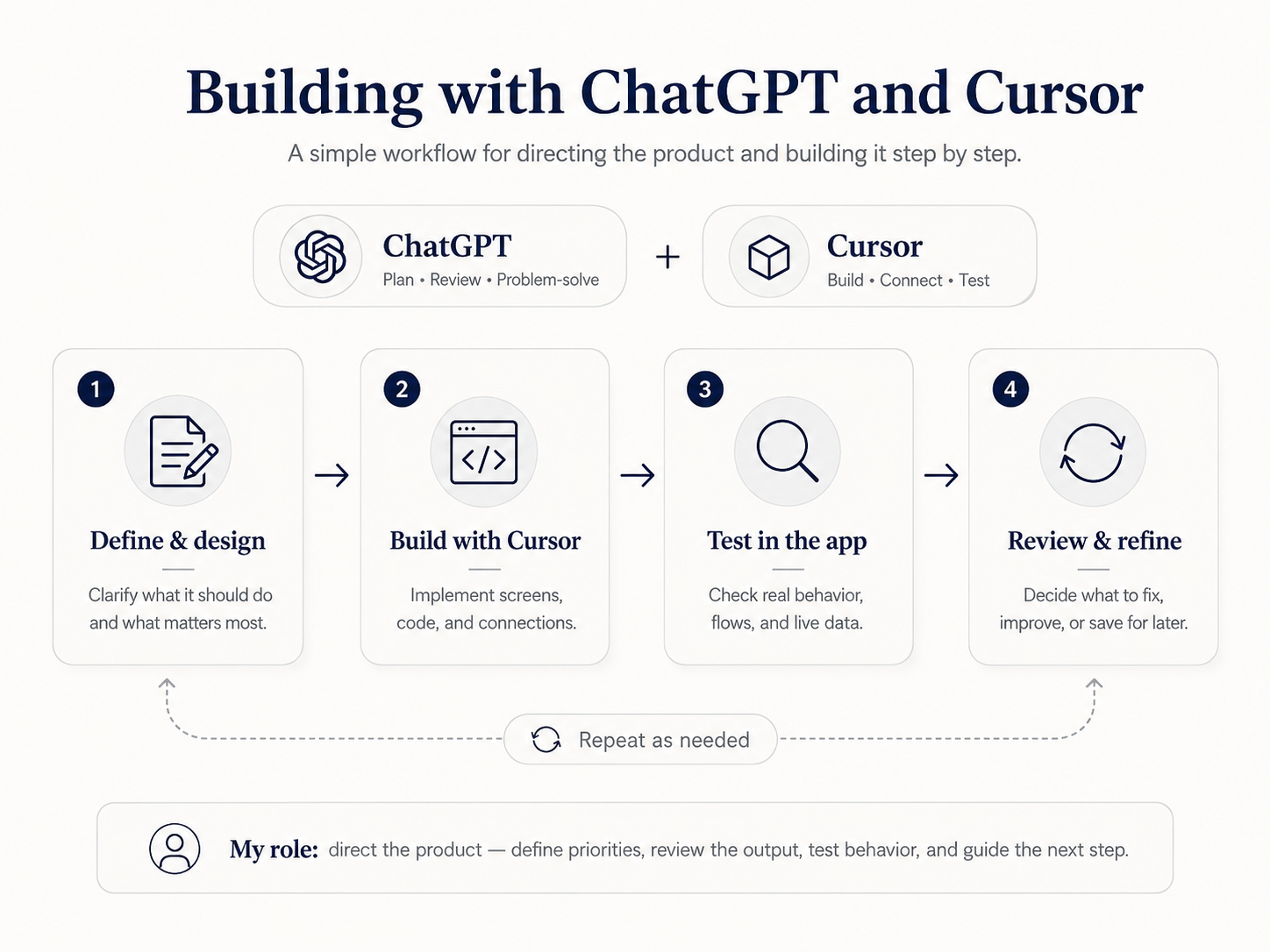
ChatGPT helped me organize the work, break larger technical problems into smaller decisions, interpret errors, compare approaches, review Cursor’s proposed changes, and decide what needed attention.
Cursor worked directly in the codebase to build screens, connect services, update responsive behavior, run tests, trace regressions, and implement the changes we had scoped.
My role wasn’t to write one perfect prompt and accept whatever came back. It was to keep directing the product: describe the intended behavior, review the result, test it with real data, catch inconsistencies, question risky assumptions, and prevent the project from expanding into things we didn’t need.
There were plenty of moments when I didn’t know the exact technical term for a problem. I could still explain what I was seeing, what I expected instead, and why the difference mattered.
In practice, it felt less like asking AI to make an app and more like directing an implementation partner through a lot of small decisions.
Making it reliable enough to use
Getting the main screens and integrations working was only part of the project. Once real household information was involved, the less visible work mattered much more.
I tested the app across desktop and mobile, improved navigation and accessibility, reduced image sizes, reviewed login and privacy behavior, and worked through what should happen when a connected source fails.
If Google Sheets, Airbnb, or Trello has a problem during an update, StayOps keeps the previous complete dataset rather than replacing it with partial information. The interface shows when the data was last refreshed and warns us when the latest sync did not finish.
I also reviewed the repository and production build for private addresses, household emails, guest names, vendor details, calendar-feed URLs, generated data, and credentials that could accidentally make their way into the public bundle.
That review uncovered real issues. Some fallback property data could still be included in production even when the app was reading from Supabase. I separated demo and operational data more clearly, sanitized the tracked fallback content, tightened the build process, and added tests to keep those problems from returning.
Another fix came from our owner-occupied property. The Property Detail screen assumed every property would have a current stay and next turnover, which caused that page to fail. Rather than inventing placeholder stay data, I changed the interface to omit sections that were not relevant.
That made the product more accurate and created room for information that matters more for an owner-occupied property, including policies, utilities, inspections, and household deadlines.
I didn’t need to become an expert in every part of the stack, but I did need to understand the consequences of the decisions, ask better questions, and test whether the app behaved safely.
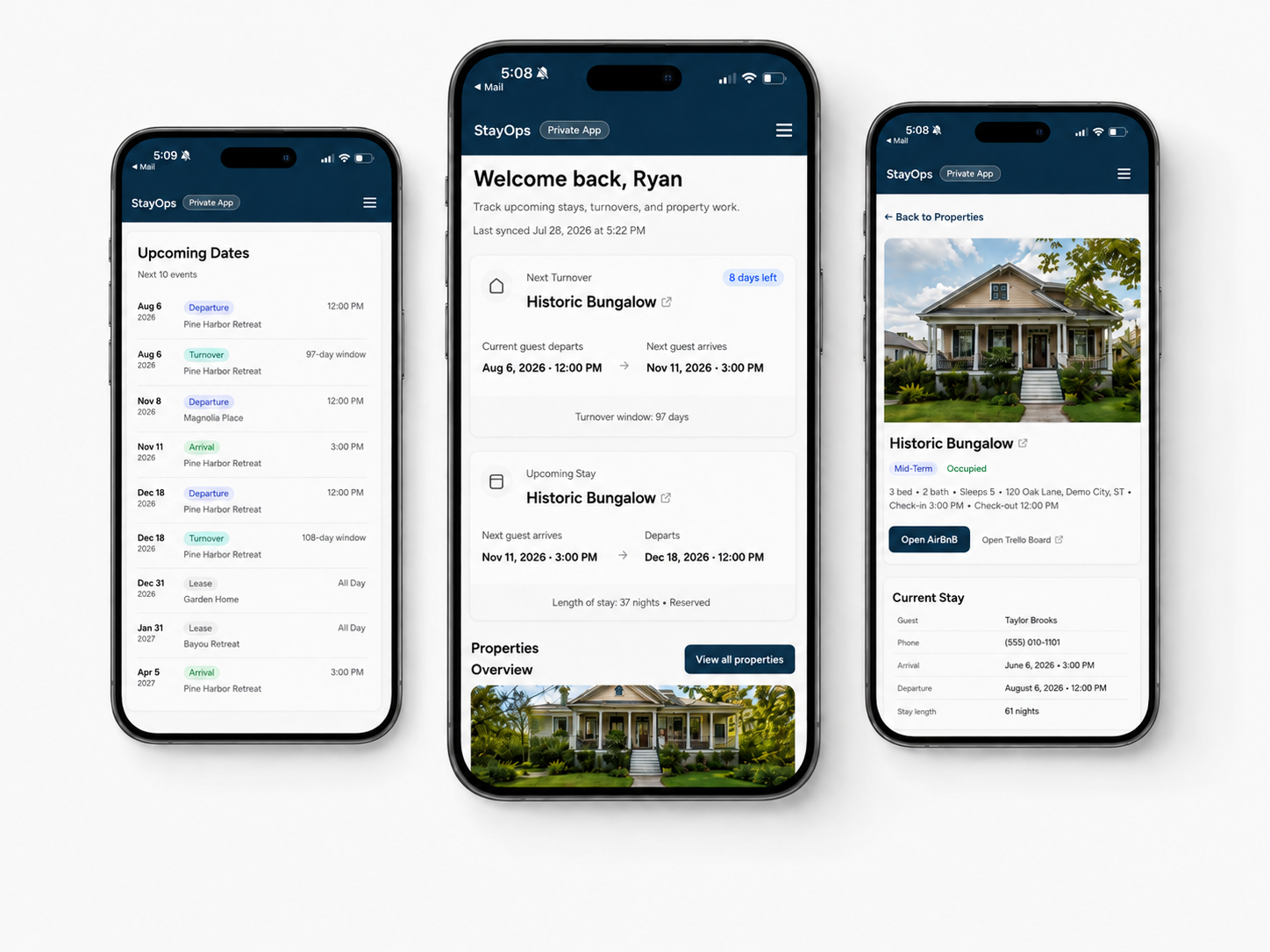
The private app shows when its connected data was last successfully refreshed.
Making updates less dependent on me
The first connected version still depended on me opening my computer and running the update process manually.
That was acceptable while I was building, but it wasn’t a useful long-term workflow. My wife should be able to update a Trello task or change something in the spreadsheet without waiting for me to refresh the app from my laptop.
I added a ‘Sync now’ action inside StayOps along with a daily hosted refresh. Updates from Google Sheets, Airbnb calendars, and Trello now flow through the hosted app and into the private database without relying on my local machine.
The app shows the latest successful refresh, and either of us can trigger another one when something changes.
That was probably the point where StayOps stopped feeling like a development project and started feeling like part of how we manage the properties.
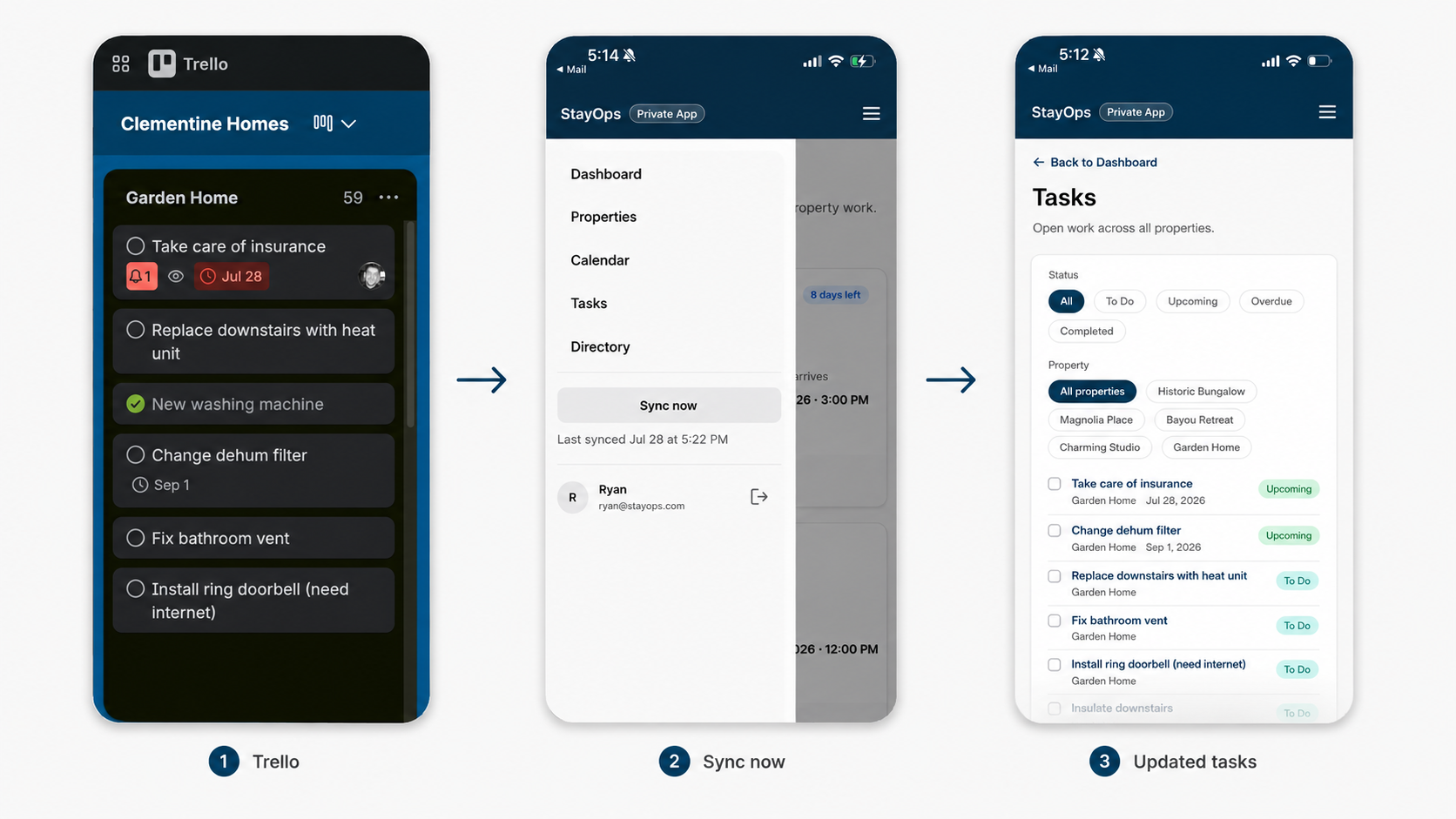
Manual and daily hosted syncing let either of us update the source tools and see the changes in StayOps without depending on my development setup.
How we use it now
StayOps now gives us one place to check property details, contacts, active stays, lease dates, arrivals and departures, turnover windows, open work, and the latest sync status.
It works on desktop and mobile, refreshes automatically each day, and can also be updated manually when we know something has changed.
We still use Google Sheets, Airbnb, Trello, email, and the other tools behind it. StayOps was never meant to replace all of them. It gives us a faster way to understand what is happening without piecing the full picture together each time.
The project also became an important milestone for me. It was the first time I carried one of my own product ideas through design, implementation, integrations, deployment, troubleshooting, privacy review, and regular use.
StayOps kept moving past the places where my personal projects would usually stop:
from Figma to a working browser app
from fictional content to connected data
from a public demo to a private product
from something running on my computer to something another person could rely on
We are already planning Policies and Utilities sections to make insurance coverage, service responsibility, account details, renewal dates, documents, and future reminders easier to manage.
We’ll keep using it and pay attention to what still sends us searching through another spreadsheet, email, PDF, or account portal.
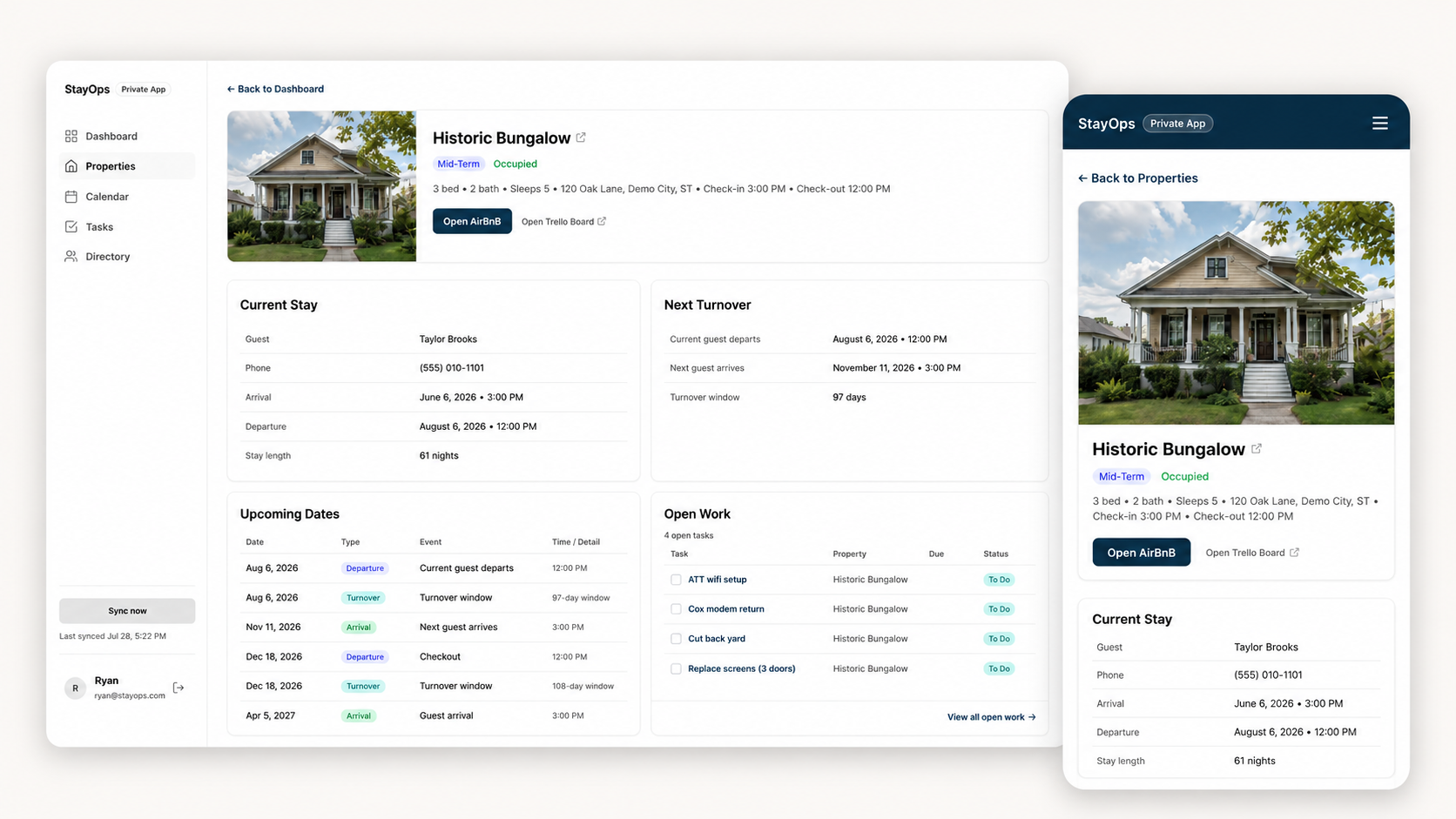
StayOps began as a way to test how far I could carry a product idea. It became a small but genuinely useful part of how we manage our properties. Explore the public StayOps demo.
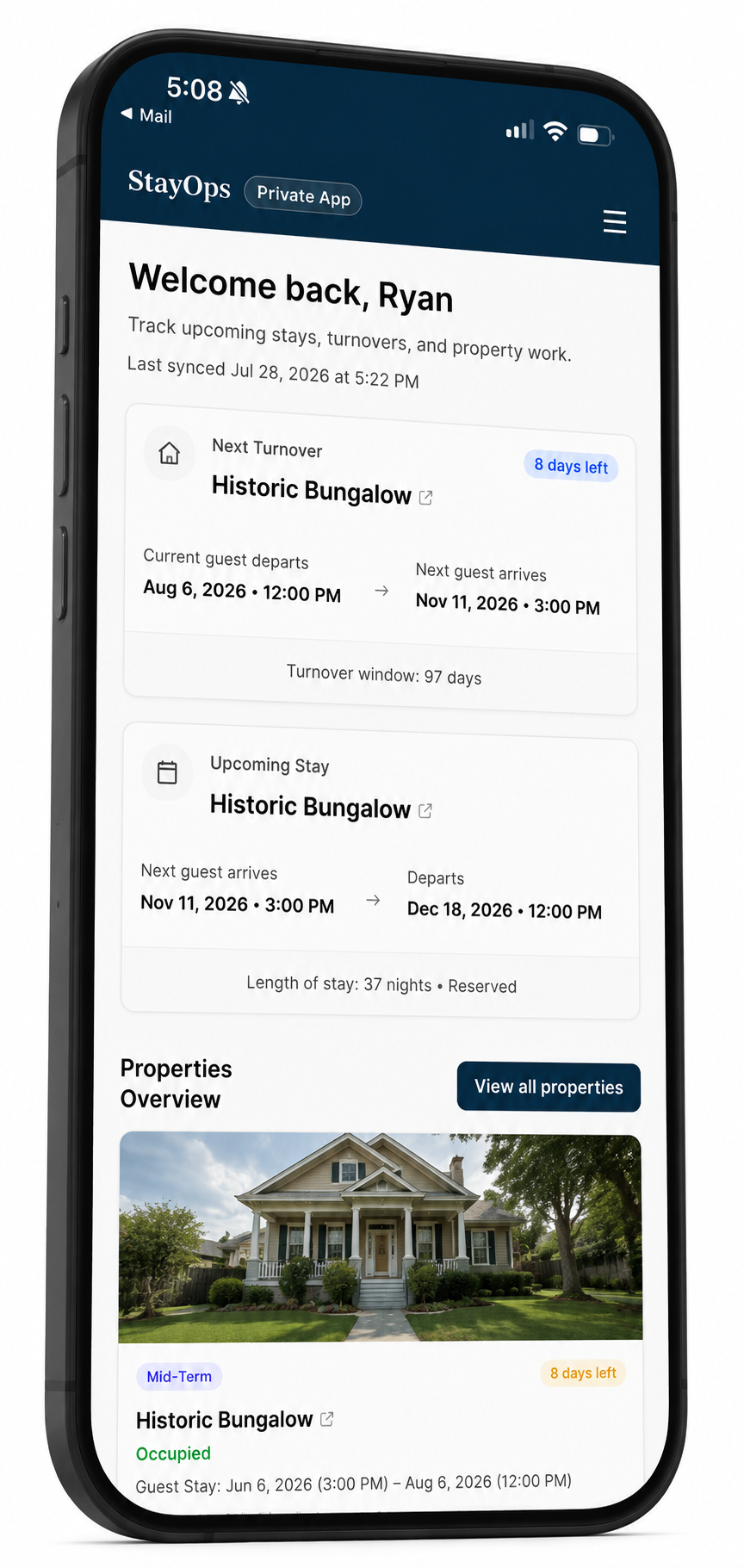
Have an internal tool you wish existed?
StayOps grew out of a very specific household workflow, but the process applies much more broadly.
I help turn scattered workflows, spreadsheets, and dashboard ideas into designed, testable working products—from early product direction through prototyping and implementation.